
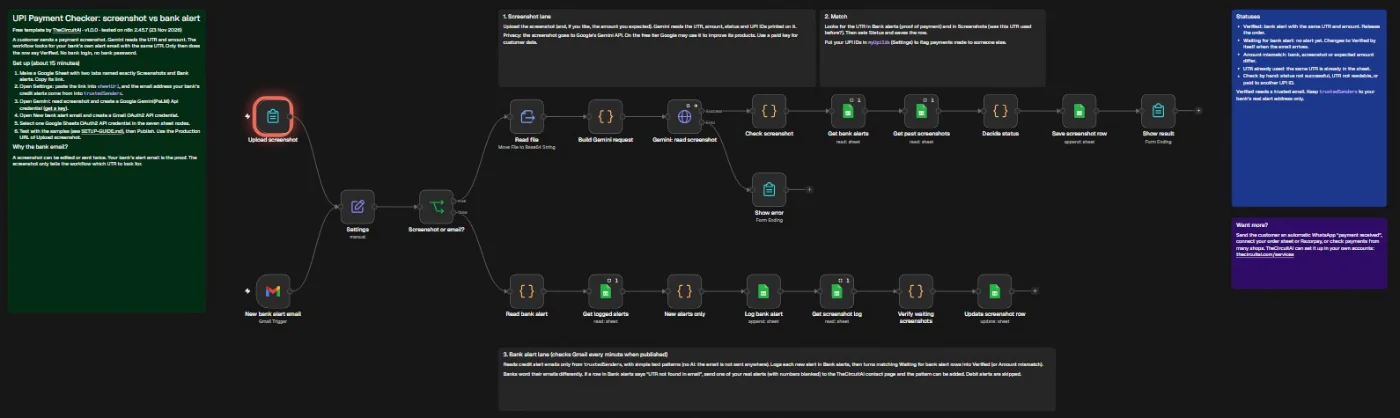
A customer pays you by UPI and sends a screenshot. But a screenshot can be edited, or sent again for a second order. This workflow reads the UTR (the 12-digit UPI reference number) and the amount from the screenshot with Gemini, and marks the payment Verified only when your bank’s own credit alert email has the same UTR and the same amount. It never asks for a bank login.
What it does
- Upload: a small n8n form with the screenshot, the order or customer, and the amount you expect (optional).
- Read: Gemini reads the UTR, the amount, the payment status and the UPI IDs printed on the screenshot.
- Bank alerts: a Gmail trigger checks every minute for credit alerts from the sender addresses you trust. It reads the UTR and the amount (not the balance) with text patterns inside n8n, so the bank emails never go to Gemini.
- Match: every screenshot gets a row in your Google Sheet with one of five statuses: Verified, Waiting for bank alert, Amount mismatch, UTR already used or Check by hand. A waiting row turns Verified by itself when the alert arrives.
What you need
- n8n 2.x, on n8n Cloud or self-hosted
- The Gmail account that gets your bank’s credit alert emails
- A Google account, for Google Sheets
- A Gemini API key from Google AI Studio
On n8n Cloud, connecting Gmail and Google Sheets is a “Sign in with Google” click. On self-hosted n8n you first create a small Google Cloud app; the setup guide walks you through it.
Watch it run
The video is in Hindi, with English captions.
What’s in the download
- The workflow file to import into n8n
- Two fictional payment screenshots (₹1,499 and ₹2,000) and the two matching sample bank alert emails
- A setup guide with every step, including a six-step test with the samples
- The MIT license: use it, change it, use it for your clients
How I tested it
On 23 November 2026, on n8n 2.45.7 (self-hosted on Windows) with Gemini 3.6 Flash, I ran the six test steps from the setup guide through the real form and the real Gmail trigger, with the fictional samples from the download, and read every row back from the sheet:
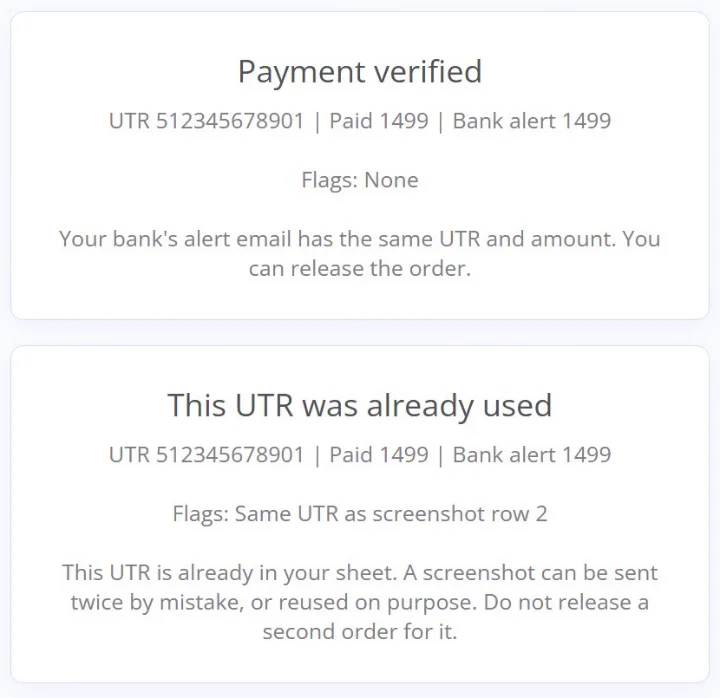
- Bank alert ₹1,499, then its screenshot: Verified.
- The same screenshot again: UTR already used, with the flag “Same UTR as screenshot row 2”.
- The ₹2,000 screenshot before its alert: Waiting for bank alert. When the ₹2,000 alert came in, the row changed to Verified by itself.
The real form found one bug my offline tests had missed: n8n sends an empty number field as 0, so a screenshot with no expected amount came out as Amount mismatch. It’s fixed in this version. In earlier runs, Gemini read the two sample screenshots in 5.1 and 26.4 seconds, skipped a transaction ID with letters and an order ID that look like a UTR, and read a UTR printed with spaces correctly. The same bank email run twice added no second row. I haven’t tested it with real payments or on n8n Cloud yet.
What it doesn’t do
- It doesn’t log in to your bank. It only reads the alert emails your bank already sends you.
- It doesn’t send the customer a WhatsApp message. That needs a Meta setup and costs money.
- It doesn’t know every bank’s email wording yet. If a Bank alerts row says “UTR not found in email”, the payment stays Waiting and you check it in your bank app.
Trusted senders only: anyone can send you an email that looks like a bank alert. Put only exact sender addresses you have checked into trustedSenders. Look-alike domains, debit alerts and money sent out are skipped.
Privacy: the screenshot goes to Google’s Gemini API. On the free tier, Google may use what you send to improve its products, so for customer screenshots use a paid API key. The bank emails are read inside your n8n and are not sent to Gemini.
This template helps you check payments; it is not banking or legal advice. Always confirm large payments in your bank app.
FAQ
Is it free?
Yes, under the MIT license: use it, change it, use it for your clients.
Does it need my bank login?
No. It reads the credit alert emails your bank already sends to your Gmail, and only from the sender addresses you list.
Can a fake screenshot get Verified?
Only if a bank alert from one of your trusted sender addresses has the same UTR and the same amount. A screenshot sent a second time is marked UTR already used.
Does it work on n8n Cloud?
It needs n8n 2.x. I tested it on self-hosted n8n. On n8n Cloud you skip the Google Cloud step, because Gmail and Google Sheets have a “Sign in with Google” option there; I haven’t run the template on n8n Cloud myself yet.
Can you set it up for me, or add the WhatsApp message?
Yes. See my services: I build it in your own accounts.